> ## Documentation Index
> Fetch the complete documentation index at: https://checkly-422f444a-tim-status-page-v3-theme-colors.mintlify.site/llms.txt
> Use this file to discover all available pages before exploring further.
# Monitoring as Code
> Define, version, and maintain your monitoring infrastructure alongside your application code
**Monitoring as Code (MaC)** treats monitoring configurations like any other code artifact—version controlled, reviewed, tested, and deployed through automated pipelines.
With MaC, you can define, version, and maintain your monitoring infrastructure alongside your application code, reusing existing tests, code, data, and other assets to create a consistent, automated, and scalable monitoring setup.
To get started with Monitoring as Code, see our [Constructs](/constructs/overview) section or [CLI](/cli/overview) section.
## Core Principles of Monitoring as Code
**Declarative Configuration**: Define your monitors, alerts, and status pages, and more in code files using structured formats (JSON, YAML, TypeScript).
**Version Control**: Store monitoring configs in Git alongside application code to maintain consistency and enable collaboration.
**Infrastructure Automation**: Deploy monitoring changes through CI/CD pipelines with the same rigor as application deployments.
### Projects
A **project** is the unit of deployment in monitoring as code. It bundles your checks, alert channels, and other resources with shared defaults and is identified by a `logicalId` that is unique within your Checkly account. Every project is defined in its own `checkly.config.ts` (or `checkly.config.js`) file at the project root, using the [Project construct](/constructs/project).
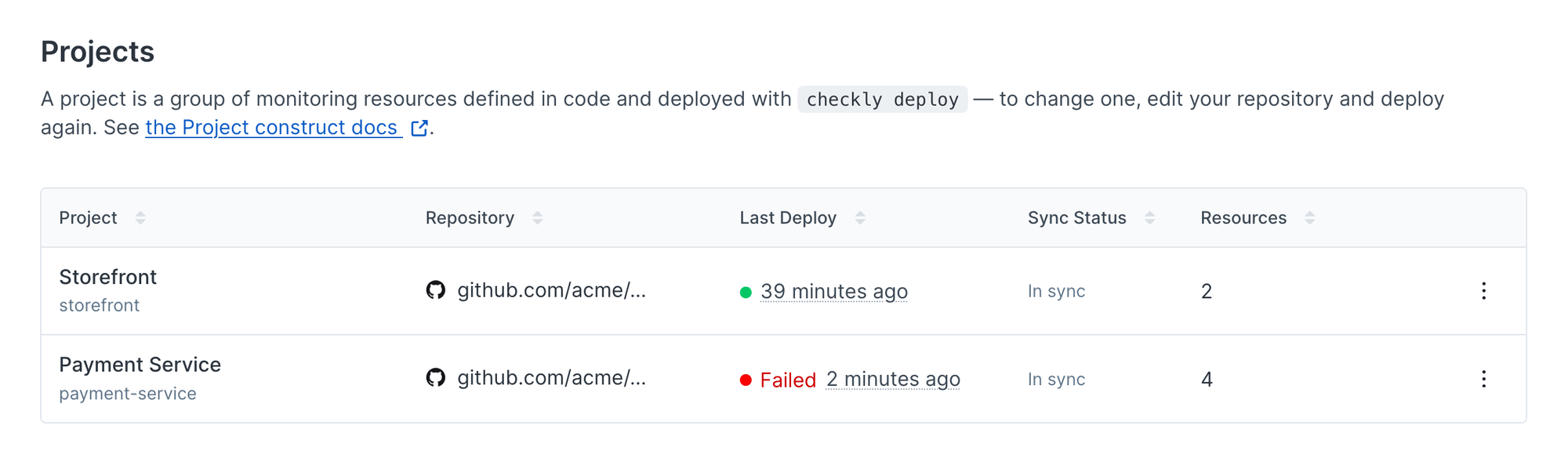 A single Checkly account can hold multiple projects. Each team can keep its monitoring code next to the service or repository it owns and deploy it independently, while all results stay in the same account. See [Logical IDs](/constructs/overview#logical-ids) for how projects and their resources are identified.
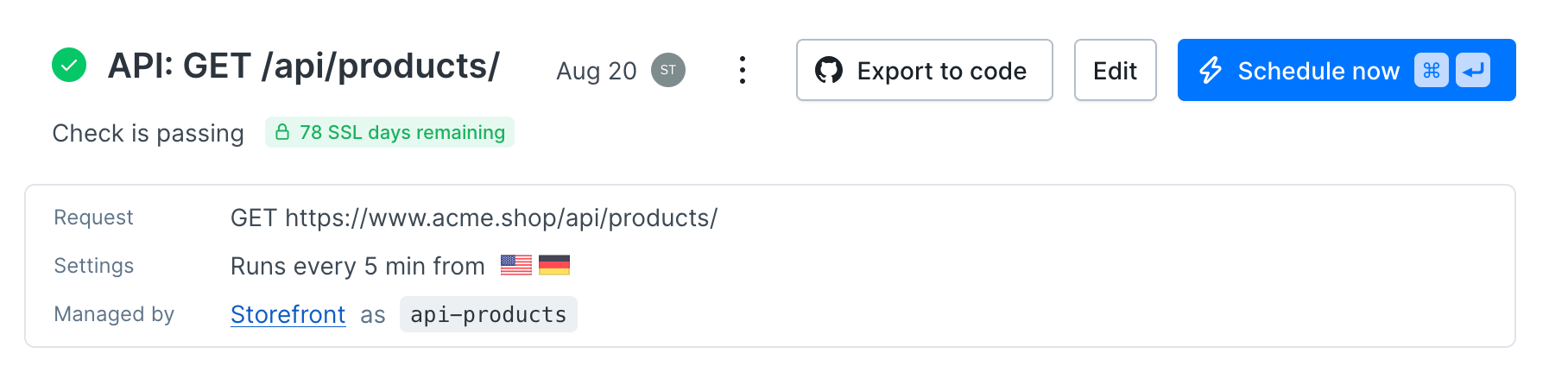
Every resource deployed from a project with [`checkly deploy`](/cli/checkly-deploy) shows a **Managed by** section in the Checkly UI. It links to the project and shows the `logicalId` the resource has within it, so you can trace any check back to the code that defines it.
A single Checkly account can hold multiple projects. Each team can keep its monitoring code next to the service or repository it owns and deploy it independently, while all results stay in the same account. See [Logical IDs](/constructs/overview#logical-ids) for how projects and their resources are identified.
Every resource deployed from a project with [`checkly deploy`](/cli/checkly-deploy) shows a **Managed by** section in the Checkly UI. It links to the project and shows the `logicalId` the resource has within it, so you can trace any check back to the code that defines it.
 ## Benefits of Monitoring as Code
* **Consistency**: Standardized monitoring across environments and teams
* **Collaboration**: Code reviews ensure monitoring best practices
* **Reliability**: Automated deployments reduce manual errors
* **Auditability**: Full change history and rollback capabilities
* **Scalability**: Template-based monitor creation for similar services
* **AI Native**: Use any LLM tooling to generate monitoring code, review code, and more.
## Implementation with Checkly
Checkly supports monitoring as code through multiple approaches:
* **[CLI](/cli/overview)**: Write checks in TypeScript/JavaScript and deploy via `checkly deploy`
* **[Terraform Provider](/integrations/iac/terraform/overview)**: Manage Checkly resources in your infrastructure code
* **[Pulumi Integration](/integrations/iac/pulumi/overview)**: Define monitoring using modern IaC patterns
* **[API](/api-reference/overview)**: Programmatically manage checks in custom automation
This approach ensures your monitoring evolves with your applications, maintaining accuracy and reducing maintenance overhead.
## Benefits of Monitoring as Code
* **Consistency**: Standardized monitoring across environments and teams
* **Collaboration**: Code reviews ensure monitoring best practices
* **Reliability**: Automated deployments reduce manual errors
* **Auditability**: Full change history and rollback capabilities
* **Scalability**: Template-based monitor creation for similar services
* **AI Native**: Use any LLM tooling to generate monitoring code, review code, and more.
## Implementation with Checkly
Checkly supports monitoring as code through multiple approaches:
* **[CLI](/cli/overview)**: Write checks in TypeScript/JavaScript and deploy via `checkly deploy`
* **[Terraform Provider](/integrations/iac/terraform/overview)**: Manage Checkly resources in your infrastructure code
* **[Pulumi Integration](/integrations/iac/pulumi/overview)**: Define monitoring using modern IaC patterns
* **[API](/api-reference/overview)**: Programmatically manage checks in custom automation
This approach ensures your monitoring evolves with your applications, maintaining accuracy and reducing maintenance overhead.